.svg)


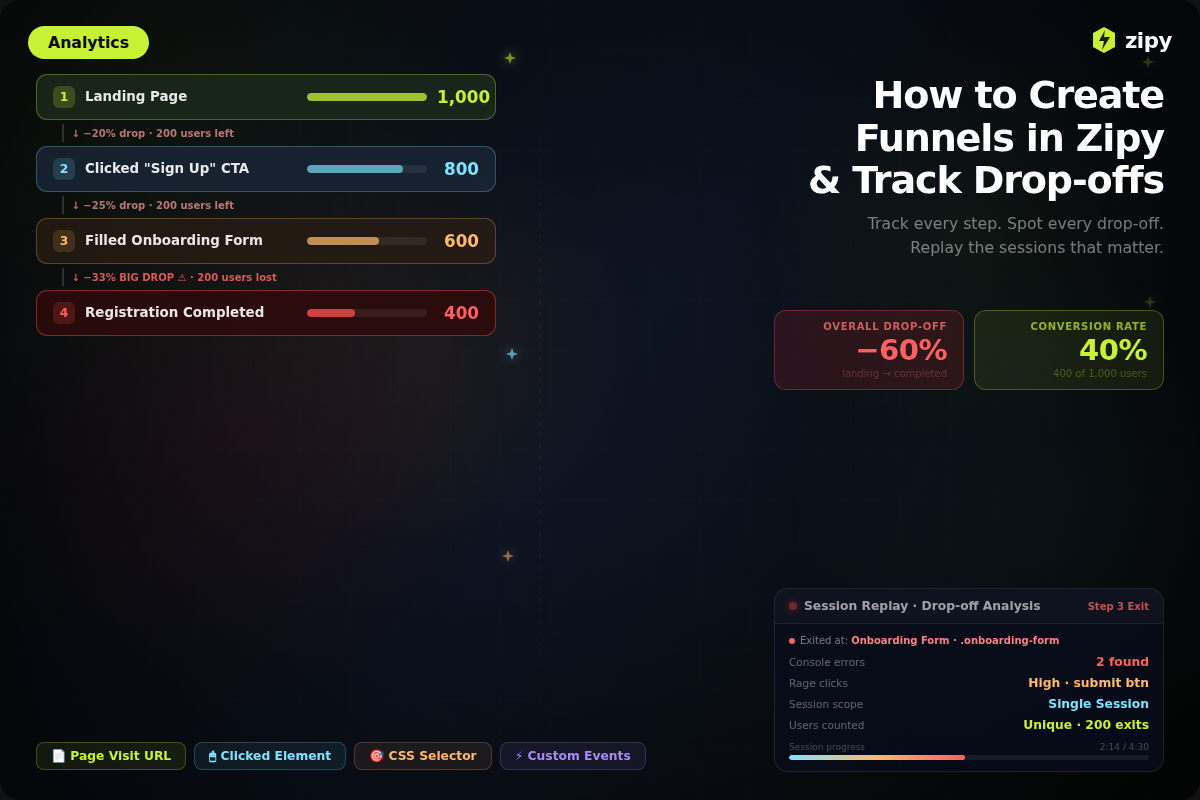


What are Zipy's funnels?
In Zipy, Funnels are a one-of-a-kind analytics tool that lets you see and plan the exact paths that users take through your app. You may find out exactly where customers lose interest or run into technical problems by breaking down a series of steps, such as the signup flow, the checkout process, or the adoption of a new feature.
What Makes Zipy Funnels Different
Zipy doesn't simply give you statistics and percentages; it also adds qualitative context to the quantitative data that other analytics tools can't give you. It helps you figure out why a user left by linking the links between knowing that they did.
Here are some of the most crucial things that are different:
- How to Use Session Replays: You can't use Zipy Funnels by themselves because they aren't charts. Funnels work quite well with Session Replays. If you find that a lot of people are leaving at a certain point, you can click through to see the genuine footage of that session.
- Error Monitoring Context: It's easy to tell if a drop-off is due to a console error, a broken button, or a UI element that isn't clear.
- Actionable Insights: You don't have to guess; you can see where the problems are. This makes it easy to fix bugs and improve the user experience.
Requirements
Make sure your surroundings are ready before you start developing your funnel. If you skip these stages, you might not acquire all the information you need.
- Setting up the Zipy SDK: Every page of your web app that is part of the funnel journey must have the Zipy SDK script installed and running.
- Finding Users: In your code, use the zipy.identify() method.
Why this is important: This links the drop-off figures to specific user accounts, so you can get in touch with those who were affected or look at certain kinds of accounts.
- Defined User Journey: Make a list of the exact URLs, button presses, or custom events that you wish to keep an eye on. For instance, /pricing → Sign Up Button → /dashboard.
- Active Traffic: Users need to be logged in and doing these things for your app to get data.
- Check Your Plan: Check to see if your current Zipy subscription lets you utilize "Funnels."
How to Build Your Funnel
Step 1: Starting the Funnel Builder
To go to the configuration tool, perform the following when you've completed the requirements:
- Sign in to your Zipy Dashboard.
- Click on the Zipy Sign: Find the sidebar menu on the left side of the screen and click on the Zipy symbol.
- Choose the Tab for Funnels: Go to the Funnels view in the Analytics panel.
- Make a New Funnel: In the upper left corner of the UI, click the + Create Funnel button.
Note: Check your membership plan settings or workspace permissions right immediately if you don't see the "Funnels" page.
Step 2: Create the steps for your funnel.
You have to utilize a funnel in a precise way. In Zipy, you can pick the exact checkpoints you wish to check.
Choose the type of step you want:
- URL Go to: It keeps track of when a user goes to a specific page, like /checkout.
- Click Event: This maintains track of when a user clicks on something in the UI, like "Add to Cart."
- Custom Event: Keeps track of events in your code that should happen, such as payment_success.
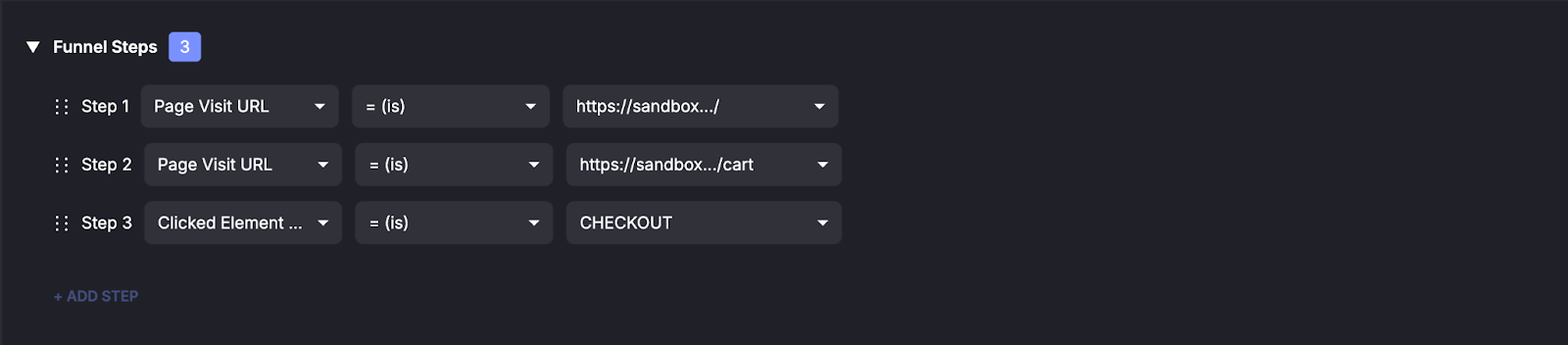
This is what a configuration might look like:
- Went to the main page (https://site.com/)
- Clicked on the link (Click Event: .signup-button)
- You've finished signing up (URL: https://site.com/dashboard)
Step 3: Set up Attribution and Scope
Choosing the correct scope for your measurement is vital if you want accurate data.
- One Session: This feature keeps track of whether or not a user finishes all of the levels in one login session. Best for simple operations like "Add to Cart" and "Checkout."
- Across Sessions: Keeps track of whether a user finishes steps over the course of numerous days or logins. The greatest way to see if people are using anything for a long time is to move from "Signed Up" to "Used Feature X" three days later.
- Unique Users vs. All Events: You can count either the Total number of times or the Unique number of persons who did the step.
Step 4: Use filters to separate groupings
Use filters to block certain categories of users from seeing your data. This helps keep the data clear.
- Gadget: Sort by desktop and mobile.
- Are you a new user or a returning user?
- Source of Visitors: Use UTM parameters to block users who come from certain marketing initiatives.

Step 5: Make the funnel and look at it.
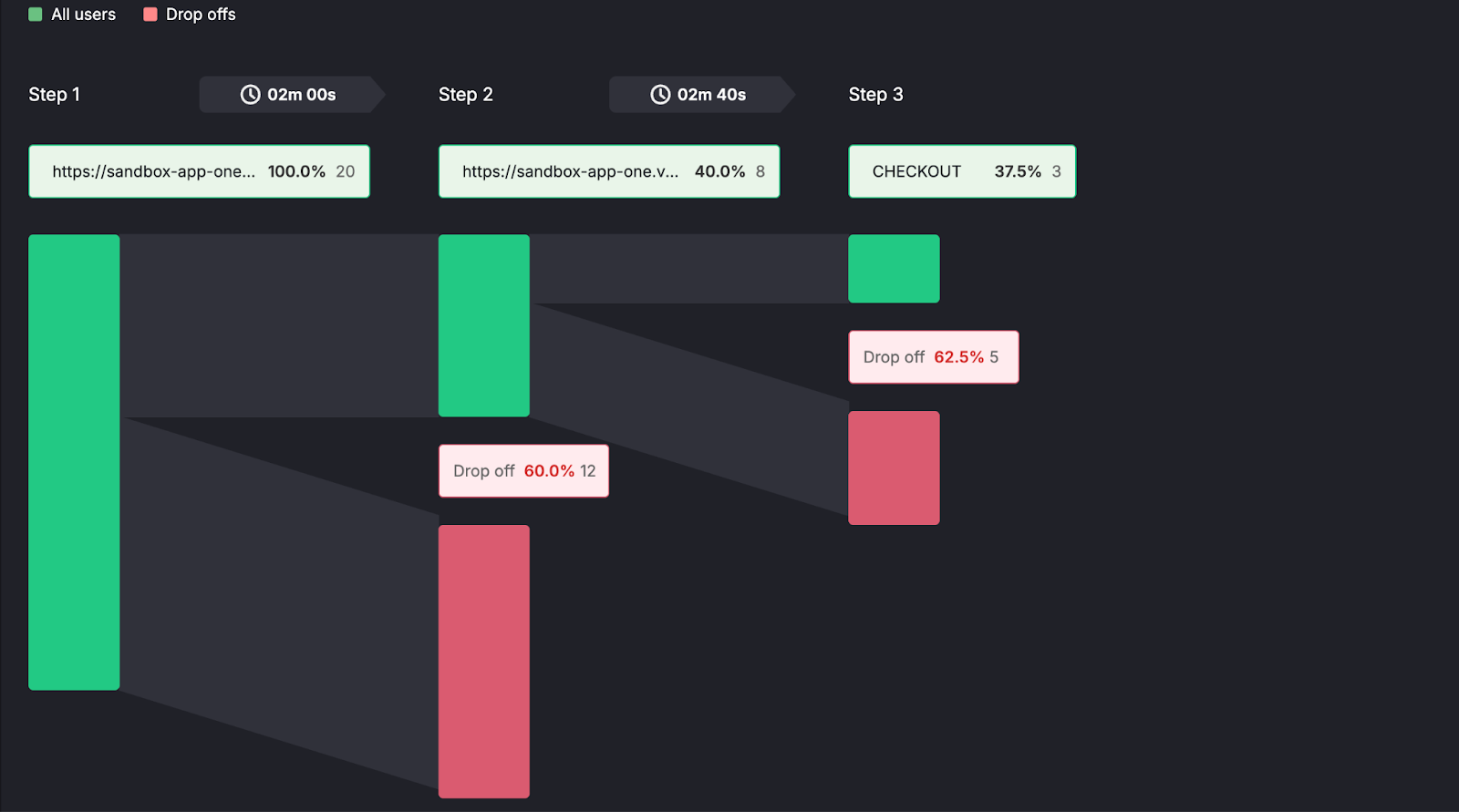
When you click Create, Zipy displays where the user is heading. You will be able to observe how many individuals are at each phase and how many leave between steps.
Getting the Information:
- Find the issue: Find the step with the most people who leave. This is the step that goes down the funnel the quickest.
With conventional analytics, you can't click on the red "Drop-off" bar. But with Session Replay, you can.
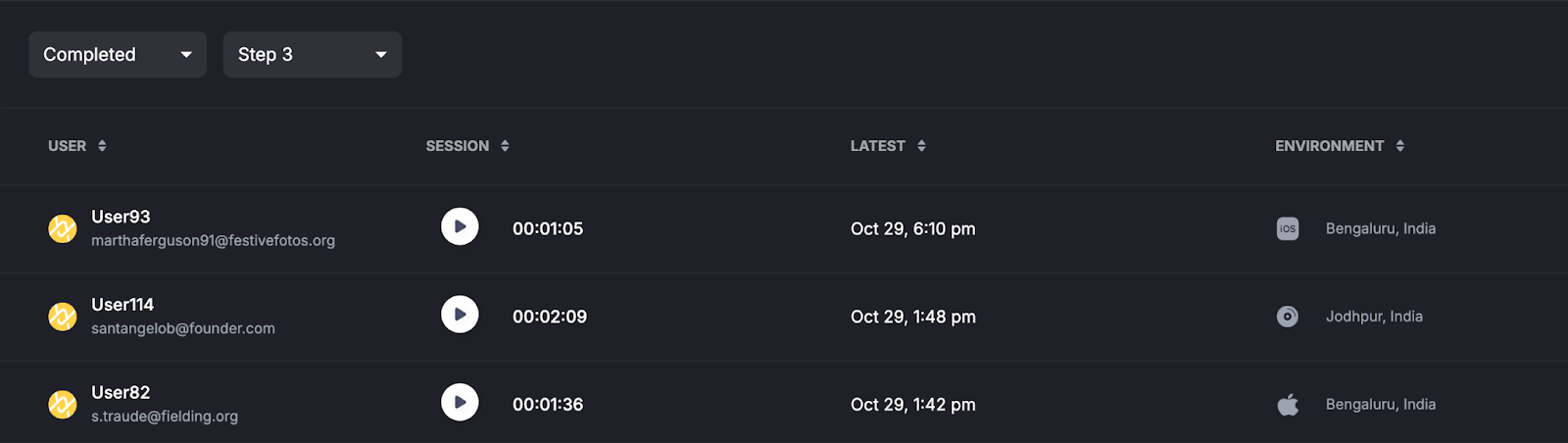
- Action: Watch the replays of those who left the funnel at this time.
Look for issues with Javascript, slow-loading spinners, rage clicks (clicking over and over again in anger), or a UI layout that is hard to understand.
Step 6: Keep going and improve things.
Data is only helpful if it makes you do something. To end the loop, use everything you learnt from the replays:
Get the Issue Fixed: You can find out what the problems are by watching the replays. Then you can correct them, speed up the page, or change how the UX looks.
For the next 7 to 14 days, check the funnel every day to see if the conversion rate goes higher and the drop-off rate goes down.
Using Drop-off Data to Fix Things
First, you need to measure the funnel. Zipy takes raw data and transforms it into a guide for fixing problems by connecting numbers to how people really use things.
1. Find out how much you lost (Precision Metrics)
Stop guessing. Zipy shows you exactly where your conversion leaks are happening.
The Insight: "Half of users leave the process after clicking 'Buy Now.'"
The Worth: This just affects one stage in the interaction, therefore it can't be a wider issue like slow site speed or navigation problems that have happened in the past.
2. Figure out what caused it (root cause analysis)
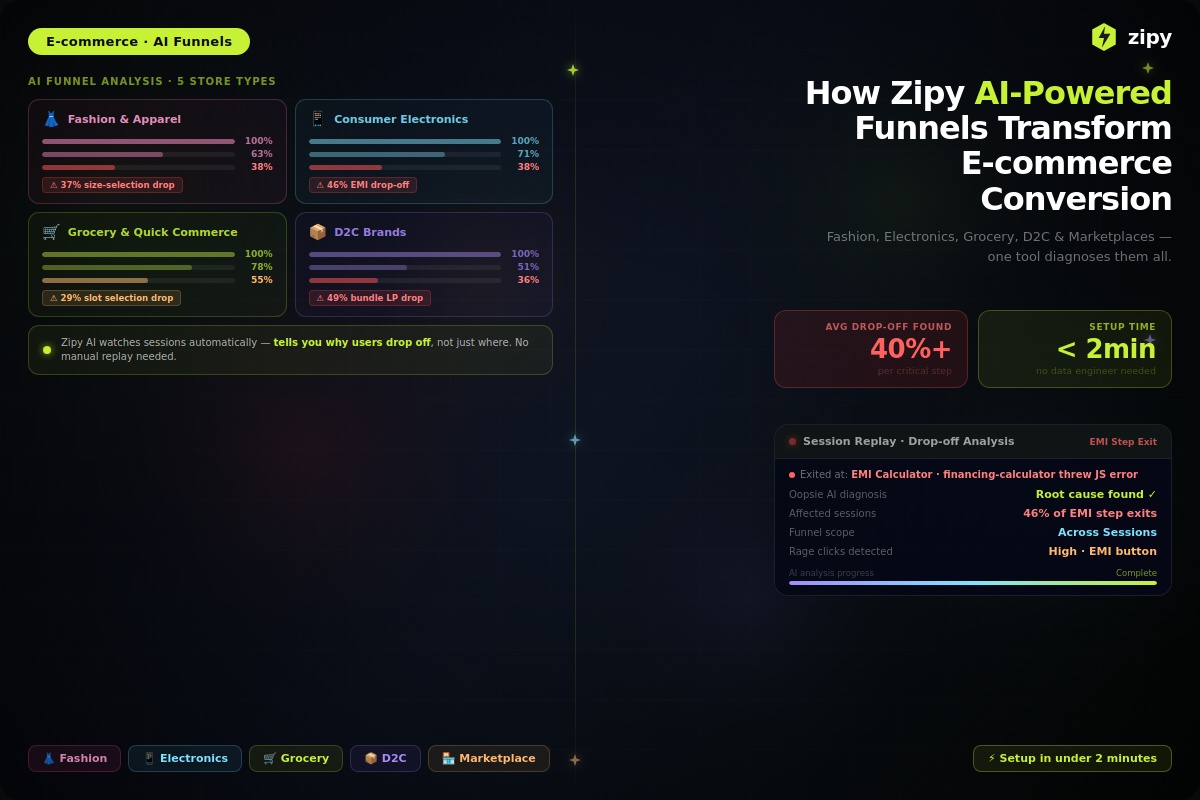
This is what sets Zipy apart from the others. You can find out that half of your users departed with standard analytics, but Zipy can tell you why.
The Mechanism: To see Session Replays of the impacted users, click on the drop-off bar.
The Truth Check: People may not be dropping off because they aren't interested; it may be because a credit card validation field is generating a silent Javascript difficulty or a popup is blocking the "Submit" button on mobile devices.
3. Give Engineering Resources the most vital jobs.
There are several types of drop-offs. You may figure out which changes are most critical for your business by connecting drop-offs to specific stages of the funnel.
Very Important: A 10% decline on the "Payment Success" screen directly affects sales.
Not very important: A 10% drop-off on a supplementary "About Us" page is not as crucial.
Efficiency: "Ghost bugs" are not something that engineering teams hunt for. Instead, they focus on recreating challenges that are known to get in the way of high-value client journeys.
Questions that are often asked (FAQs)
1. Why does my funnel state "No Data" when I know that people are visiting these pages?
This is probably because the URL Matching parameters are too stringent.
The Problem: If you pick "Exact Match" for a step like /pricing, Zipy will not include any URL that has extra characters, including query parameters (for example, /pricing?utm_source=google).
Change the way your steps are set up from "Exact Match" to "Contains."
If you set the criterion to "URL Contains /pricing," the funnel data will include all variants of the URL.
2. Can you watch the tape of a session that someone who left was in?
The "Qualitative Analysis" aspect is what makes Zipy stand out from the rest.
How to think about it: Find the red "Drop-off" bar in your Funnel view. This shows you how many folks didn't move on to the following step.
Clicking on this bar will show you a list of session records for those users. You can see exactly what they did before they quit, such as when they were confused about a form field, or got an error in the console.
3. Does Zipy construct funnels for data that is already there?
Yes, you can look at events that happened in the past with Zipy.
A lot of analytics tools just start tracking after a funnel is created, whereas Zipy looks at your historical data.
The Need: If you have the Zipy SDK installed and operating on your site before, you may construct a new funnel today and observe how people acted last week or last month right immediately.
4. What do the terms "Any Order" and "This Order" mean in the steps of a funnel?
This parameter lets you choose how rigorous the order of your user journey measurement is.
This Order (Strict Flow): Step A, then Step B, and ultimately Step C must be done by the user.
Best for paths with phases, like "Checkout" or "Onboarding Wizards," where missing a step terminates the process.
Any Order (Loose Flow): The user must finish all the stages in the same session, but they can do them in any sequence.
Best for: Big aims that will change people. For instance, "Did the user read the blog and then sign up?" It doesn't matter if they signed up before or after reading the blog, as long as they did both.


.webp)

.svg)