.svg)


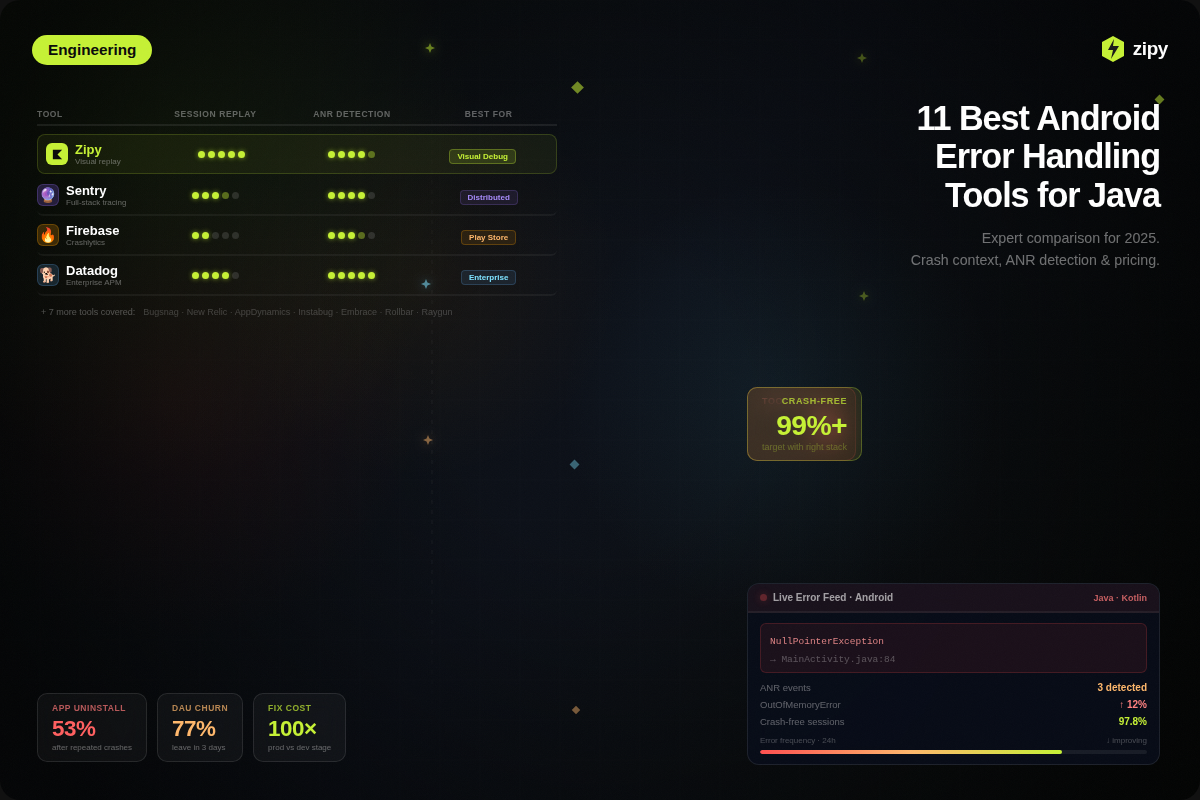


The 11 best Android error handling tools for Java developers.
This is something that Android developers (Java/Kotlin), DevOps engineers, and CTOs should read.
DataDog for full enterprise observability, Zipy for visual session replay to fix crashes, and Sentry for full-stack distributed tracing are the best Android tools for fixing errors in 2025.
Firebase Crashlytics is still the bare minimum for getting noticed on Google Play, but it doesn't always help with complex debugging.
You need a special platform that does more than just basic logging to keep your APK stable and keep users from leaving. This guide talks about the best Java/Kotlin error monitoring tools. It compares things like crash context, pricing models, and special features like ANR detection and the ability to host your own server.
Why apps need to be able to handle mistakes well
It's not enough to just stop apps from crashing when they do something wrong. In 2026, a big part of User Experience (UX) will be dealing with mistakes and keeping customers coming in.
If you don't handle exceptions properly, like Java's NullPointerException or OutOfMemoryError, things can get worse than just one session crashing.
The Cost of Not Paying Attention to Exceptions
If you don't fix mistakes well, you'll have more technical debt and fewer users. 53% of people who use an app delete it if it crashes or freezes a lot, which is what the industry says.
Here are the business risks that come with this:
- User Frustration and Churn: If the UncaughtExceptionHandler doesn't work and the app crashes, people won't trust it anymore. Recent information shows that 77% of daily active users (DAUs) stop using the app within the first three days if it doesn't work right.
- Risks to Data Integrity: If mistakes aren't fixed properly during data persistence (like SQLite or Room database transactions), they can ruin user files or cause data loss that can't be fixed.
- Reputation in the App Store: Apps that have a lot of ANR (Application Not Responding) errors are punished by the Google Play Store algorithm. When your app crashes a lot, people give it one-star reviews. This makes it much harder for people to find you in organic search results.
- Exponential Operational Costs: The "1-10-100" rule of software development still holds true: fixing a bug in production is thought to cost 100 times as much as fixing it during the development phase (IBM Systems Sciences Institute).
Simple ways to fix Java errors on Android
Your codebase needs to meet strict hygiene standards before you can use advanced observability platforms like Zipy or DataDog. Tools can't fix broken logic at its core, no matter how good they are. Every senior Android developer should know these four simple rules for fixing Java errors.
1. Learning how to use try-catch blocks
The first thing you should do is use the try-catch block, but a lot of people don't.
Put only code that could cause problems at runtime in the try block. This will keep risky operations separate. This includes things like making network calls, reading and writing files, and parsing JSON. Don't put big pieces of code together because it makes it harder to find bugs.
Don't "swallow exceptions." Always fill in the catch block. A "bare" catch block doesn't make a sound when it fails, which makes it hard to debug.
You should always log the exception (at the very least) or throw it again if the current method doesn't work.
2. Using Custom Exceptions
Standard Java exceptions, such as NullPointerException and IllegalArgumentException, talk about technical problems, but they don't always give you all the information you need.
You can make your own exception classes, like UserNotAuthorizedException or PaymentGatewayTimeout, to connect errors directly to business logic.
The Benefit: This gives your monitoring tools semantic data, which lets you quickly tell if a code crash is a real business edge case or not.
3. Timber and Logcat for Smart Logging
Logging well is what links a crash to a fix. The standard android.util.Log class is a good place to start, but modern development needs to be more strict.
Don't just say "Error occurred." Write down the inputs that caused the error, the user's state, and the stack trace.
Security Warning (Trust & Compliance): Never write down your email address, passwords, or authentication tokens. All of these are examples of Personally Identifiable Information (PII). This is a big security hole that could cause you legal implications.
Tip: You can use wrappers like Timber to automatically delete logs from production builds. This will keep debug data from getting out to the public.
4. How to program defensively
Defensive programming is proactive, not reactive. It means being ready for edge cases before they cause the app to crash.
- Check the input: "Sanitise" all the data that comes into your app from APIs or users.
- Null Safety: Use @NonNull and @Nullable to make sure your Java code follows all the rules.
- Graceful Degradation: If a part of your UI breaks, make sure it can handle it without problems (for example, by showing a "Retry" button instead of a blank screen).
The Best Ways to Find and Fix Android Errors (2025)
You need an outside "black box" to record what happens in the wild now that your internal Java handling is safe. Let's start with the two best options for modern development teams: Zipy (for visual context) and Sentry (for full-stack depth). After that, we will look at the best candidates.
1. Zipy
Best for: Agencies, product managers, and developers who need to see the crash to believe it.
Zipy is different because it can answer the question, "What was the user doing right before the app crashed?" It combines regular error tracking with Session Replay, which lets you watch a video-like recording of the user's taps, swipes, and navigation leading up to the error.
Important Features for Android Developers
- Session Replay and UX Context: Zipy records the visual journey, which is not something that regular loggers do. You don't need "Steps to Reproduce" anymore because you can see exactly what button the user clicked or what screen froze.
- Unified Android/Java Diagnostics: It puts ADB logs, network calls, and stack traces all on one timeline that matches up with the video replay.
- Privacy-First SDK: The Android SDK is small and has built-in PII (Personally Identifiable Information) masking to make sure it follows GDPR rules.
- "Oopsie" AI Analysis: Zipy's AI engine automatically groups errors into categories, such as UI freezes and backend timeouts, and suggests possible fixes.
Pricing:
- Free Tier / Free Forever: Up to 1,000 sessions/month with core features.
- Growth Plan: ~$25/month
- Enterprise Plan: For larger usage (higher session counts, longer data retention, enterprise-features etc.).
Pros:
- Visual Context: Fixes bugs that say "cannot reproduce" right away.
- No-Code Setup: It's easy for PMs who aren't tech-savvy to find bugs.
- Agency Friendly: It's easy for clients to get "proof" from you.
2. Sentry
Best for: full-stack engineers and big companies that need to connect a lot of data in the backend.
Sentry is the best in the business for a reason. It's great at Distributed Tracing, which means that Sentry can link two events if your Android app crashes because a backend API failed 500ms later.
Key Features for Android Developers
- Deep Context with Breadcrumbs: Sentry remembers everything that happened before a crash, such as changes in the activity lifecycle, system broadcasts, and warnings about low memory.
- Performance Monitoring (Vitals): It has built-in tools for keeping an eye on Android metrics like Cold Start Time, Slow Frames (Jank), and ANR rates.
- Release Health: A special dashboard shows the rate of sessions that didn't crash for your most recent APK version in real time.
- NDK Support: Sentry supports native crash reporting as well as Java/Kotlin. This is important for games and other apps that use C/C++ libraries and do a lot of processing.
Pricing (2026):
- Developer (Free): $0/month — 1 user, error monitoring & tracing, email alerts, basic dashboards.
- Team: $26/month (if billed annually) — unlimited users, third-party integrations, 20 custom dashboards.
- Business: $80/month (if billed annually) — all “Team” features + insights (90-day lookback), unlimited dashboards, advanced quota management, SAML/SCIM support.
- Enterprise: Custom pricing — designed for large organisations with advanced needs (dedicated support, custom terms etc.).
Pros:
- Distributed Tracing: Links crashes on mobile devices to errors on the server.
- An ecosystem that works with Jira, GitHub, Slack, and other tools.
- Performance Vitals: The best way to keep track of ANR and "Jank."
Cons:
- Complicated UI: It's hard for new users to learn.
- Prices that change: Costs can go up a lot if there are a lot of events.
3. BugSnag
Best For: Teams that care a lot about the "99.9% Crash-Free" metric and put mobile first.
BugSnag from SmartBear is more than just an error logger; it also keeps an eye on the health of your APK. Android teams love it because it ranks errors by how many users are actually affected, not just by how many errors there are.
Key Features for Android Developers
- The Stability Score is a clear number, like "99.95% of sessions were crash-free," that tells you if a release is stable enough for everyone to use.
- ANR Detection: This is the best way to find "Application Not Responding" errors, which are very important for keeping your Google Play Store rankings high.
- Feature Flags and Experiments: Watch out for bugs that only happen when you do A/B tests or add new features.
- Deep Android Integration: It works with NDK (C++) crashes and React Native, and it has special "breadcrumbs" for events in the Android lifecycle, such as onPause and onResume.
Prices for BugSnag in 2026
- Lite/Free Tier: Great for people who just want to play with it (basic retention).
- Tier for Select: Starts at about $20 a month for up to 50,000 events.
- Preferred Tier: Costs about $33 a month and adds advanced segmentation and stability scores.
Pros:
- The Stability Centre is the best health metric in the business for a quick look.
- Mobile First: The best way to fix NDK and ANR bugs.
Cons:
- Cost Scaling: Prices can go up a lot if your user base grows quickly.
- Siloed: There isn't as much emphasis on backend/full-stack correlation as there is with Sentry.
4. Raygun
Best For: Teams and agencies that need to keep an eye on both crashes and Real User Monitoring (RUM).
Raygun answers the question, "Did this error really make the user leave?" by using crash reporting and real user monitoring (RUM) to connect code-level errors to business results.
Things that are important for Android developers
- Real User Monitoring (RUM) doesn't just run fake tests; it also keeps track of real users' load times, network latency, and UI freezing.
- User-Centric Profiles: If you click on a user profile, you can see all of their sessions, crashes, and performance issues.
- Deployment Tracking: Automatically connects spikes in errors to certain version uploads, such as "Version 2.1 added 5 new bugs."
Raygun prices in 2026
- Basic (Free Trial / Entry Tier): Great for developers who want to experiment with error monitoring and explore the dashboard. Includes unlimited apps, members, basic features, and limited retention.
- Basic Paid Tier: Starts at about $40/month for 100,000 errors per month.
- Team Tier: Starts at about $80/month for 200,000 errors per month.
- Business Tier: Starts at about $400/month for 1,000,000 errors per month.
- Enterprise Tier:Custom pricing based on event volume and compliance needs. Adds custom terms, unlimited reports, custom SLAs, Slack channel support, data retention control, and carryover events.
Pros:
- RUM Integration: This is the best way to speed up and stabilize your app at the same time.
- Unlimited Seats: This is great for agencies that have a lot of developers.
Disadvantages:
- Modular Pricing: You have to pay separately for Crash Reporting, RUM, and APM.
- Setup: It takes more work to set up RUM and Crash Reporting at first.
5. Rollbar
Best for: New businesses and DevOps teams that want a workflow that they can set and forget.
Rollbar is different because of its "Automation-Grade Grouping." Other tools might send you a thousand emails about the same error, but Rollbar groups them smartly and can turn them into Jira tickets or Slack alerts without anyone having to do anything.
Key Features for Developers of Android Apps
- Real-Time AI Grouping: The engine can tell when similar errors are really the same problem, which makes alerts a lot less annoying.
- Telemetry and Stack Traces: You can see the values of variables right when the crash happened with accurate "local variable" capture.
- Strong integrations: You can sync with GitHub, GitLab, and Jira in both directions. For example, fixing a ticket in Jira also fixes the error in Rollbar.
Rollbar prices in 2026
- Free: $0/month (forever). Includes up to 5,000 occurrences + 1,000 sessions per month.
- Essentials: $15.83/month (when billed annually) or roughly ~$15.83/month as listed. Includes features beyond Free: data retention up to 90 days, fine-grained rate limiting.
- Advanced: $32.50/month (when billed annually). Adds higher data retention (up to 180 days), adaptive alerts, SCIM provisioning etc.
- Enterprise: Custom pricing for very large volumes or additional enterprise-grade features (SLAs, direct Slack channel, etc).
Pros:
- Generous Free Tier: 5,000 events per month is a lot for apps that are just starting out.
- Alert Hygiene: Fewer spam alerts thanks to better grouping.
Disadvantages:
- Mobile Depth: This one doesn't have the same ANR/NDK depth as BugSnag.
- UI: The interface works, but it's not as responsive and well maintained as compared to Zipy or Sentry.
6. Google Firebase's Crashlytics
Best For: Everyone, really. It is the free, default place to start developing for Android.
You really need Firebase Crashlytics if you want to make an Android app. Google owns it, and it powers the Play Store's "Android Vitals." Most developers use Firebase with paid tools like Sentry or Zipy because it is the "source of truth" for Google's ranking algorithms.
Key Features for Android Developers
- Use Google Analytics 4 (GA4) to create "Audiences" based on crashes. For instance, you could make a list of users who crashed on Version 2.0 and send them a push notification when Version 2.1 goes live.
- Velocity Alerts: Get alerts right away if a certain crash suddenly rises, which means the release is broken.
- Smart Grouping: It uses smart algorithms to group stack traces so you don't have to look through 5,000 lines to find the same NullPointerException.
Firebase prices for 2026
- Price: Free (with no limits).
Important: Crashlytics is free, but some parts of Firebase, like the Database and Storage, cost money to use.
Pros:
- Native Ecosystem: This has a direct effect on how easy it is to find apps on Google Play.
- Pricing: The best deal and commendable features for free.
Cons:
- Slow: It can take hours for dashboards to get new data.
- Limited Context: No session replay or backend tracing.
7. Luciq AI (Instabug)
Best For: Beta testing and teams that care more about what users say than what the code looks like.
Instabug is very popular because of the "Shake to Report" feature. It makes it easy for people who aren't tech-savvy to report bugs, which helps QA teams, beta testers, and developers work together.
Key Features for Android Developers
- Shake-to-Report: Users can shake their phone to take a screenshot, add notes to it, and send a bug report.
- Repro Steps: The SDK keeps track of what the user did before the report, like when they tapped Button A and then swiped left.
- In-App Surveys: After a session, ask users for key feedback needed to make services better.
Prices for Instabug in 2026
- Basic: Starts at $149 a month for regular bug reporting.
- Pros: It costs $249 a month to start (for advanced analytics and integrations).
- Enterprise: Custom pricing is needed for apps with a lot of users.
Pros:
- QA Gold Standard: The time it takes to report QA goes down a lot.
- Contextual Feedback: Links user complaints to logs.
Disadvantages:
- Expensive: The price of entry is much higher than that of other businesses.
- Not as much focus on deep backend performance in this niche.
8. Datadog
Best for: DevOps teams that need to see everything (frontend, backend, and infrastructure) in one place.
DataDog is more than just a crash reporter; it also watches over your infrastructure. If your Android app uses complex microservices or cloud architecture (AWS/Azure), DataDog lets you see the mobile tap all the way to the database query that caused the error.
The most important things for Android developers
- RUM (Real User Monitoring) shows how long it takes for pages to load and "rage taps",which are when users tap a frozen screen in anger.
- Error Tracking: Looking for connections between mobile crashes and spikes in the backend server.
- Log Management: The best tools for finding and indexing large logs in the business.
Prices for Datadog in 2026
- Every 1,000 sessions per month of Mobile RUM costs $1.50.
- Log ingestion costs ten cents per gigabyte.
- Infrastructure costs $15 a month for each host.
Be careful: costs are not fixed. You have to pay for Logs, RUM, and Hosts separately, which can make it hard to keep track of your bills.
Pros:
- Full Stack Visibility: This is the best tool for complex architectures.
- Ecosystem: More than 600 integrations, such as AWS, Docker, and Slack.
Cons:
- Hard to learn: Developers who only work on mobile apps have a hard time learning.
- Bills that are hard to guess: Prices can go up based on how much you use them.
9. New Relic
Best for: Engineers who need good data for their business and want a free tier.
New Relic competes with DataDog, but its "All-in-One" pricing model makes it stand out. It lets you look deep into the code and uses AI to find problems before they cause outages.
Key Features for Android Developers
- Mobile Agent: Automatically adds code to your Java or Kotlin code to find HTTP errors and network problems.
- You can use Service Maps to see how your app depends on other things and see if a third-party API is slowing it down.
- Applied Intelligence: AI that connects related events to cut down on alert noise.
Prices for New Relic in 2026
- Free Tier: You get 100 GB of storage space for free every month for life. This is very nice of you to do for new businesses.
- Standard: You pay as you go after 100GB, which is about $0.30 per GB.
Users have to pay between $49 and $99 per month to fully use the platform, depending on their role.
Pros:
- One of the best Storages: You can get 100GB for free, which is a lot of space before you have to pay.
- You only pay for what you use.
Cons:
- UI/UX: The interface can seem cluttered when compared to newer tools.
10. AppDynamics from Cisco
Best for: Large companies that want to connect app performance to business and revenue metrics.
Cisco bought AppDynamics, which is a very powerful tool. It focuses on "Business Transactions." Instead of just saying, "The app crashed," it says, "This crash cost you $45,000 in checkouts."
Important Things for Android Developers to Know
- Business iQ: Dashboards that show you how your code is doing right now and how it affects your business's key performance indicators (KPIs), such as revenue and conversion rates.
- End-User Monitoring (EUM) checks out how people all over the world are using the service on different carriers and in different places.
- Deep Code-Level Diagnostics: Pictures of code running when performance drops.
AppDynamics prices in 2026 Model:
Quotes for Custom Businesses. (Estimated cost: $6 to $90 per agent per month, depending on the module.)
Pros:
- Focus on business: Talks to executives in their own language (Revenue).
- Scalability: Made to work with big companies like those on the Fortune 500 list.
Drawbacks:
- High Barrier: It costs a lot of money and is hard to install.
- Not good for small agencies or indie developers.
11. AirBrake
Best For: Teams that want to be able to easily find mistakes and pay for them as they go.
Airbrake is the "utility player" that helps you keep track of your mistakes.
It doesn't try to be a full observability platform like DataDog does. It only does one thing: it tells you when your code breaks. The way it prices things is good for traffic that goes up and down.
Things Android Developers Should Know
- Lightweight Notifier: The Android SDK is really small. It catches exceptions that aren't handled and sends them to the dashboard without making your APK bigger.
- "Spike Forgiveness": Other tools will charge you extra right away if your app goes viral (or crashes all the time), but Airbrake's Pro plans often include a buffer for short-term event spikes.
- Breadcrumbs are simple timeline views that show what happened before the crash, but they aren't as clear as Zipy.
Prices for AirBrake in 2026
- Developer Tier: Starts at about $19 a month and includes one user, which is great for people who work for themselves.
- The Basic Tier costs about $38 a month and lets you have as many users as you want.
- The Pro Tier starts at about $76 a month and adds audit logs and higher usage limits.
Conclusion
By 2025, the industry standard had changed from just keeping track of mistakes to also figuring out what the user experience was that led to them. That's why it's easier to make apps for Android now. Try-catch blocks and defensive programming are still important for keeping an APK stable, but they won't fix the "cannot reproduce" bugs that make people leave right away.
The Full Answer to the Zipy Benefit
The gap between a line of code in a stack trace and the action that caused it is a big problem that keeps coming up in this research on the top 11 tools. Zipy fills this gap by giving you a single place to see everything, including high-quality Session Replay and detailed error logs.
Zipy stops the "Cannot Reproduce" cycle by giving you a recording of how the user moved around (taps, swipes, and navigation) and the technical logs, like a video. This makes it easier to fix UI crashes and freezes that don't happen all the time and are hard to figure out.
Zipy's no-code setup and visual interface make it easier for Product Managers and Agencies to find bugs, even if they don't know much about Java or Kotlin. You don't need to know how to use DevOps to use these advanced tools for infrastructure.
Zipy not only remembers mistakes, but it also has AI tools like "Oopsie" that help you figure out what went wrong. It groups failures on its own, like big backend timeouts and small UI bugs. This makes sure that programmers fix the bugs that will hurt sales the most.
To keep a 99.9% crash-free session rate, you need to know not only that an app crashed, but also what caused it to crash. Zipy puts all of your network calls, device logs, and visual context into one timeline so you can see everything you need to keep your code safe and your brand's reputation high.
Questions and Answers (FAQ)
1. How can I reproduce Android crashes that I can't do on my own?
Zipy is the best tool for making hard crashes happen again. Zipy differs from other loggers because it has a feature called Session Replay that shows a video of what the user did (swipes, taps, inputs) just before the crash.
2. Is Firebase Crashlytics enough to make Android apps for work?
Firebase Crashlytics is a great free tool for keeping track of crash rates and App Store rankings, but it doesn't always have the information you need to fix hard bugs. Professional teams often use Firebase with a dedicated observability platform like Zipy or Sentry to learn more about ANRs and logic errors.
3. How do I fix problems that say "Application Not Responding" (ANR)?
To fix ANRs, you need to figure out what is stopping the main thread. BugSnag and Sentry are two tools that can help you find ANRs by giving you special metrics. But Zipy tells developers which screen or action caused the freeze, so they can fix the specific UI thread operations that are making things slow.
4. Can you use these tools with both Java and Kotlin apps?
Yes, all of the big tools on the list (Zipy, Sentry, DataDog, BugSnag) work with both Java and Kotlin. They also let games and apps that need a lot of processing power report crashes using NDK (C++).


.webp)

.svg)