.svg)


Top 7 Best Monitoring Tools for Kotlin Apps: Expert Comparison & Pricing 2026
Instead of just fixing bugs after they happen, proactive Kotlin app monitoring means making your architecture easier to see so you can find stability problems before they affect users. The best way to lower Mean Time To Resolution (MTTR) is to use a dedicated monitoring tool like Zipy along with detailed exception handling.
Standard tests are helpful, but they can't show loopholes in the Android Ecosystem. This guide lists the seven best monitoring tools that are used in the industry and explains seven architectural rules that must be followed to keep the crash-free rate above 99%. These principles cover everything from strategic logging to stopping silent failures. This analysis will help you choose the best observability stack to keep users and performance high, whether you're fixing Android ANRs or following backend coroutines.
Why You Should Keep an Eye on Your Kotlin App
In reality, there are thousands of devices, network conditions, and user behaviours that can't be tested in a lab.
Industry standards say that mobile apps that crash more often lose a lot of users.
These are the technical reasons why you need a strong monitoring stack:
- Proactive Problem Detection (Lower MTTR): Find and fix runtime exceptions before they get a lot of bad reviews. This makes your Mean Time to Resolution (MTTR) a lot shorter.
- Protect User Retention: Apps that are stable are directly linked to higher Life Time Value (LTV). People stop using apps that crash or freeze right away.
- Debugging with a lot of information: Don't just believe what users say. Monitoring tools show you exact stack traces, device states, and user breadcrumbs so you can find the problem right away.
- Check for "Application Not Responding" (ANR) errors and memory leaks to make sure that rendering runs at 60 frames per second without any problems. This is what performance and ANR optimization are.
Seven important things you should do to keep your Android stable before it breaks
If you want to stop fixing bugs after they happen and make your app stable ahead of time, you need to add observability to its architecture. These are the seven main ways to make a Kotlin app that can handle problems.
1. Use specific ways to handle exceptions
Avoid the "catch-all" anti-pattern. Broad catch (e: Exception) blocks hide important crash data, which makes it harder to figure out what went wrong.
Best Practice: Separate different types of failures, like I/O and Timeout, to start different recovery flows.
Kotlin
The Silent Failure: A Bad Idea
give it a go
// A risky move
} catch (e: Exception) {
Log.e("MyApp", "Error: ${e.message}") // The context is gone
}
// Expert Practice: How to Handle Granular
give it a try
Request from the network
} catch (e: IOException) {
Log.e("MyApp", "Can't connect to the network: ${e.message}")
showOfflineState() // Recovery for the UI in particular
} catch (e: TimeoutException) {
Log.e("MyApp", "Connection Timed Out: ${e.message}")
promptRetry() // What the user does
}
2. The Detective's Journal: Smart Logging
It's not how much you log; it's how efficiently you do it. By organising your logs, automated monitoring tools can tell the difference between important signals and noise.
- Error (Log.e): Big problems, like crashes and API failures.
- Warning (Log.w): There could be problems (unexpected nulls, APIs that are no longer supported).
- Info (Log.i): High-level flow events, like when a user logs in or the database syncs.
- Debug (Log.d): This gives developers information about how variables perform.
- Verbose (Log.v): Keeping track of everything in great detail.
3. Add contextual metadata to errors to make them more helpful.
A message that just shows "error" without any other information is usually not helpful. Adding metadata about the state of the device to your exceptions will make it easier to find bugs.
- User context: User ID and session ID.
- The model, OS version, battery level, and orientation are all part of the device context.
- Network context: what kind of network it is (WiFi or cellular) and how strong the signal is.
4. Managing sessions and user breadcrumbs
Instead of trying to guess what users will do, use "Breadcrumbing." This method keeps track of the actions that users take before a crash, such as ScreenView -> ButtonClick -> NetworkRequest. You can now make reproductions that will help you fix the bug.
5. Protect Asynchronous Coroutines
When Kotlin does things like network calls and database queries that don't happen at the same time, it often gets IllegalStateException and fails.
Always set up a CoroutineExceptionHandler or use structured concurrency when using Kotlin Coroutines to keep errors in the background from crashing the UI thread.
6. Before you use the data, make sure to check it.
- You should never trust what the client or server says. To avoid crashes, look at the data at the edges of your app.
- Cleaning up input means getting rid of extra spaces and making sure the formats are correct (for example, Email and Regex).
- Null Safety: Kotlin has built-in null safety features (like ? and !!) that can help you avoid NullPointerExceptions.
7. Test important edge cases under stress
To make your tests more reliable and authoritative, you should test environment variables very carefully:
- Changes to the network, like switching from WiFi to Mobile Data in the middle of a request.
- Resource constraints mean that there isn't enough memory or storage.
- Interruptions in the UI: getting a call or turning the device while making a transaction.
The Best Ways to Watch Kotlin: Client vs. Server
Where your Kotlin code is located has a big impact on which tool you should use. Is it running on a user's Android phone or tablet, or is it powering a microservice on the backend? People in the industry use these as the best solutions.
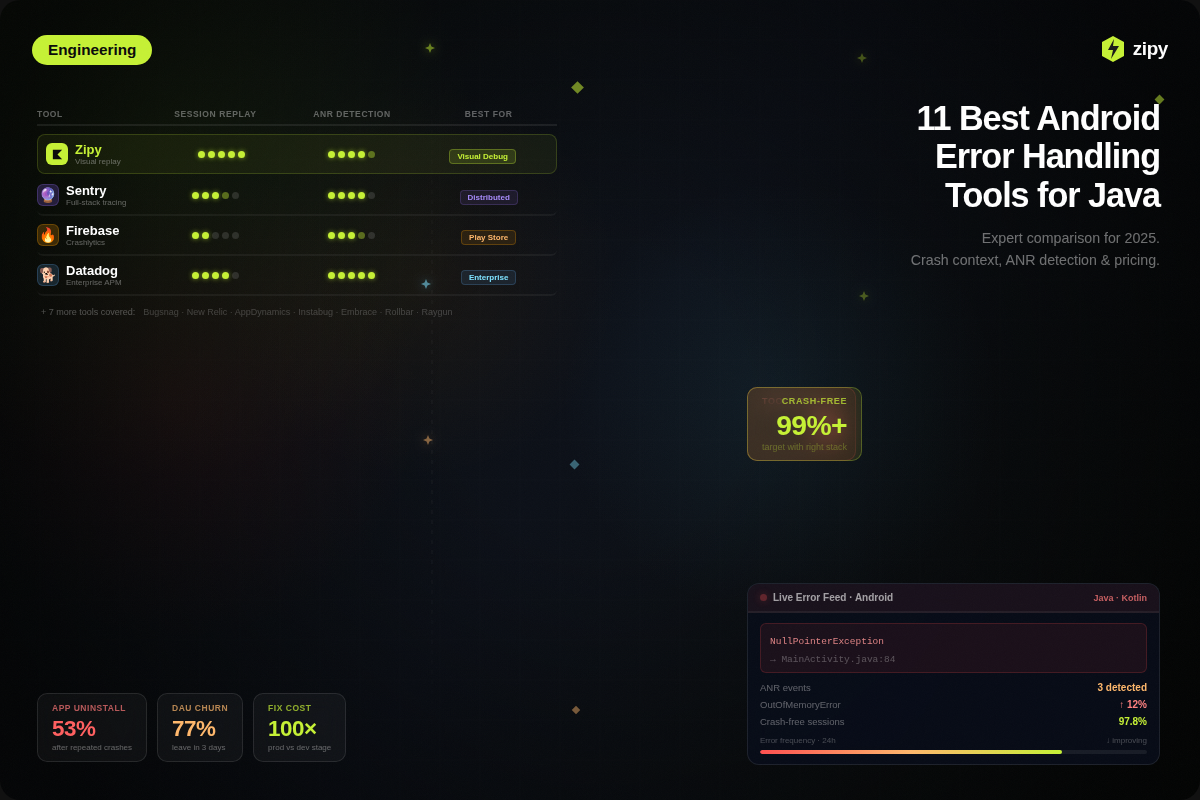
1. Zipy
Type: Analytics for Crash and Session Replay
Zipy does more than just show stack traces; it also shows Android developers "Who, What, and How" for each crash. It combines regular error tracking with Session Replay, which shows you how the user got to an ANR or crash.
Best For: All teams that need to find and fix bugs that are hard to find when testing on their own devices.
Key Differentiator: Session Replay saves the crash video and all the information about the console, network, and device state.
Pros:
- Replays quickly put an end to fights over "Works on my machine."
- It is simple to set up and works with an SDK.
- Network sanitisation in detail protects users' private data.
Pricing:
- The Free Plan costs $0
- The Growth Plan starts at $25 per month
- The Enterprise Plan custom.
2. Kotzilla
Type: Kotlin Dependency Injection Monitoring for Certain Tasks
Kotzilla was made only for the Koin framework for dependency injection. If your architecture relies heavily on Koin or Kotlin Multiplatform (KMP), Kotzilla can give you information that other tools can't.
Best For: Android and KMP developers who work with the Koin framework.
What makes it different is that it uses AI for root analysis. It makes "Contextual Prompts" that have crash details that you can copy and paste into AI coding assistants to get a fix.
Pros:
- The only tool made just for Koin internals.
- The "AI Prompts" feature speeds up debugging a lot.
- A great way to improve "Cold Start" times.
Cons:
- Niche focus: Not as useful if you use Dagger or Hilt.
- A newer player than well-known ones like Sentry.
- Prices are in Euros (€), which could change how some things are charged.
Pricing:
- Solo Dev: Free for one user, unlimited applications monitored, and up to about 1 million events (about 500 sessions) per month.
- Dev Team: €59 per month for each user, up to 12 users. Users get about 1 million events a month (about 500 sessions) and can use as many apps as they want.
- Enterprise: You need to ask for a quote or make a special request. It has unlimited sessions, users, and premium support, as well as advanced data and security features.
3. Luciq (Instabug)
Type: Reporting bugs and giving feedback in the app
Luciq (Instabug) records the "voice of the user." Its one-of-a-kind "Shake to Report" feature lets people who aren't tech-savvy send detailed crash reports without having to write anything.
Best for: Teams that work on mobile first and need beta users or QA testers to send in bug reports that are clear and detailed.
The fact that it has Shake-to-Report is what makes it different. Adds "Reproduction Steps," screenshots, and screen recordings to every ticket without any help.
Pros:
- Less back-and-forth with QA teams.
- The "Repro Steps" feature is a big time saver.
- Works great with GitHub, Slack, and Jira.
Cons:
- Costly: Plans for beginners are much more expensive than those of other companies.
- You can't use advanced analytics or session replay unless you pay for a higher level.
Pricing:
- The basic plan costs about $249 a month.
- The pro plan costs about $499 per month.
- The ultimate plan costs $749 a month.
4. New Relic
Type: A single platform for seeing everything
New Relic is the "Command Centre" for looking at things. It does a great job of connecting a slow button press on an Android phone to the exact database query that is making it slow three layers deep in your backend.
Best for: Full-stack teams that are in charge of both the Android app and the API on the back end.
One Data Platform is what makes it special. Unlike other tools, New Relic does not show "Mobile" and "Backend" in separate graphs.
Pros:
- A very generous free tier of 100GB per month.
- No one else can see backend dependencies like this.
- Common in the business; it's easy to find developers who know it.
Cons:
- Some developers may find the UI to be too much if they only want simple crash logs.
- If logs aren't filtered, the price based on usage can go up without warning.
Pricing:
- Free tier: Includes 100 GB/month data ingest and 1 full-platform user at no cost.
- Usage-based pricing: Charges apply per user and per GB of data ingested (≈ $0.35–$0.55/GB beyond free limits).
- Scales with team size: Paid plans start at ~$10/month and increase based on users, data volume, and advanced features.
5. Sentry
Type: Applications for Tracking Errors and Monitoring
Sentry is likely the most popular crash reporting tool among Kotlin developers right now. It puts a lot of focus on Developer Experience (DX) by giving you the stack trace and the "Suspect Commit" that most likely caused the bug.
Best For: Android development teams that need quick, useful information about crashes.
The main difference is that the suspect does. Sentry goes through your Git history and marks the last developer who made changes to the code block that crashed.
Pros:
- Developer-Centric: Developers made it for other developers.
- Works well with Kotlin and Android Studio.
- "Suspect Commits" cuts down on the time it takes to sort through cases by hours.
Cons:
- Apps that get a lot of traffic can quickly reach their sampling limits.
- "Business" features, like advanced data retention, cost more now.
Pricing:
- Developer: $0 a month, One person, it has basic alerts, error tracking and monitoring, and a limit.
- Team: $26 a month, billed once a year, Users with no limits, More dashboards, connections to other apps, and a bigger quota.
- Business: About $80 a month if you pay once a year, Adds more advanced features, like unlimited dashboards, more alerts, SAML/SCIM, and a longer data lookback (90 days).
- Enterprise: For large groups or companies with specific needs, such as dedicated support or data residency.
6. Raygun
Type: Real User Monitoring (RUM) and Crash Reporting
Raygun is different from other services because it has Real User Monitoring (RUM). Raygun checks the quality of the session, such as load times and frozen frames, while other tools check for crashes.
Best for: Teams that care about "Application Performance" and "User Satisfaction" numbers.
The flame charts are what make it stand out. It shows you the path your code takes to run so you can see which function is using the most CPU.
Pros:
- Flame Charts are great tools for adjusting performance visually.
- A straightforward and easy-to-understand "Pay as you go" model.
- Each user's session gets a lot of attention.
Cons:
- The cost goes up for each event with more traffic.
- Not as good as New Relic at seeing what's going on in the backend or infrastructure.
Pricing: It costs about $8 for 10,000 events and can grow (about $40 to $60 per month for 100,000 events).
7. Bugsnag
Type: Error Monitoring & Crash Reporting (Kotlin-first, Multiplatform)
BugSnag focuses heavily on stability and release health rather than just individual crashes. Instead of only showing raw errors, it groups them intelligently and ties each issue to app versions, deployments, and releases, helping teams understand what broke after what change.
It works especially well for Kotlin and Kotlin Multiplatform apps, allowing teams to track crashes across Android, shared KMP logic, and frontend JavaScript (via source maps).
Best for: Teams that care about app stability, crash-free users, and release-based error analysis.
What makes Bugsnag stand out is its stability score and release tracking—you can clearly see whether a new version improved or worsened app health.
Pros:
- Excellent Kotlin & Kotlin Multiplatform support
- Smart error grouping reduces noise significantly
- Strong release tracking (before vs after deploy impact)
- Clear visibility into crash-free sessions and users
Cons:
- Limited Real User Monitoring (RUM) compared to Raygun or Datadog
- No built-in session replay or flame charts
- UI is more stability-focused than performance-focused
Pricing:
Starts around $47/month for ~7,500 events and scales with usage. Pricing increases with higher event volume and team size.
5 Important Things to Keep in Mind When Picking a Monitoring Stack
Everyone has to follow the same rules for monitoring, but the tool you choose needs to work with your Android architecture and the stage of your business.
1. The "Observer Effect" on How Well You Do
The app-watching tool should never slow down the app.
- Startup Time: Does the SDK start up on the main thread? Look for tools that work with Lazy Loading.
- APK Size: Check the size of the SDK, like 200KB vs. 2MB.
- Battery Drain: Make sure the tool groups network requests to save battery life.
2. GDPR and privacy rules
If you have users in the EU or California, "Data Privacy" can no longer be treated as an option.
- Data Scrubbing: Does the tool automatically hide personally identifiable information (PII) like credit card numbers and emails in logs?
- Data Residency: Can you choose where your data is kept, like on servers that are only in the EU?
3. Processing in Real Time vs. in Batches
- Real-Time: This is important for financial apps (to find fraud) or live commerce.
- Batch processing is fine for apps that deal with content.
4. Integration with the Kotlin Ecosystem
- Gradle Support: Is there a Gradle plugin that lets you automatically upload ProGuard/R8 mapping files?
- Can the tool find bugs that happen inside suspend functions when it supports coroutines?
5. Cost vs. Growth
- Free Tier Traps: A lot of tools get expensive quickly after you reach 10,000 MAU.
- Data Retention: Plans that cost less often delete data after 7 to 14 days, which makes it harder to debug long-term.
Conclusion
You can't just create faultless code anymore. You also need to have a strong observability architecture that can spot "silent failures" before they impact User Lifetime Value (LTV). We need to stop mending things when they break and start watching them before they do. You can use Instana and New Relic to manage microservices on the server side, but you need to do something extra on the client side to actually speed up Mean Time To Resolution (MTTR). The best way to monitor Android and Kotlin Apps is using Zipy.
We tried ten different tools and discovered that Zipy was the best at keeping Android clients stable. Standard APM tools offer stack traces, but they don't always say why a device crashed.
Zipy solves the "Observer Effect" and problems with fragmentation in three key ways:
- You can watch a video replay of the user's session using Zipy, whereas Sentry and Crashlytics just look at logs. This fixes the "Works on My Machine" problem by showing developers exactly what the user performed before an ANR or crash, like gestures, network state, and battery level.
- Kotlin developers who are having trouble with Coroutine failures that are hard to understand or race conditions that happen at the same time can use Zipy as a "Production Debugger". It helps them test their code in a way that is similar to how people will use it in real life.
- Privacy-First Architecture: Zipy is the greatest approach to scale apps during GDPR and tight data privacy since it can get rid of PII while preserving high-fidelity technical data.
The Path to Good Architecture
This short optimisation roadmap will help you maintain your app and ensure it runs smoothly:
- Get rid of traps that are too general: To handle these exceptions in a given way, change the code from "catch (e: Exception)" to "catch (IOException) or (TimeoutException)."
- Use Zipy to discover crashes on the client side that aren't recorded.
- Use a global CoroutineExceptionHandler to stop problems that occur in the background from crashing the UI thread.
- Don't simply set alerts based on how often tech problems happen; also set them depending on how they affect the business. For instance, "Checkout Flow Failed."
- Using technologies like Zipy to combine disciplined exception handling with visual intelligence can make observability easier and give you an edge over the competition that keeps users satisfied.
Frequently Asked Questions About Monitoring Kotlin
1. What is the best way to keep an eye on Android Kotlin apps?
Zipy is a great choice for Android apps that run on the client side because it has a Session Replay feature that shows exactly what the user did to make the app crash.
2. What should I do if something goes wrong with Kotlin Coroutines?
Don't ignore errors that happen in the background. As part of their work, experts define a CoroutineExceptionHandler or use structured concurrency. This guarantees that errors that happen during asynchronous tasks, such as network calls, are safely sent to the UI thread for processing.
3. What is the difference between Log.e and Log.w?
For logging to work well, you need to filter by severity. Use Log.e (Error) for big problems that need to be fixed right away, like crashes or API timeouts. If something might go wrong, like old APIs or unexpected null values, use Log.w (Warning). These things won't crash the app right away, but they could make it unstable.
4. What does the "Observer Effect" mean for keeping an eye on apps?
The "Observer Effect" is when a monitoring tool makes an app work worse. When picking a tool, make sure the SDK is small (doesn't take up a lot of space on your device), supports lazy loading (to keep startup time low), and groups network requests (to save battery life).


.webp)

.svg)